Recent Posts

Programming
13 May 2012 0 Comments

Hello World with JSF 2.0, Glassfish 3, Maven, SVN and Eclipse

Introduction

Serious Java Web application development requires a lot of different applications. In addition to a JDK, an IDE and an application server you may need a Web application framework, a build system and some form of version control. Unsurprisingly, getting set up for development can be quite the task.

In this post we’ll take a look at setting up a Web application project from start to finish. The software we will use is:

What Are We Building?

Different applications come in different forms.

  • A Windows application written in C++ may be compiled to a .exe file.
  • Runnable Java GUI applications often come in a JAR (Java ARchive).
  • Java Web applications are packaged in WAR and EAR files.

We are building a Web application, so the product of building our project will be a WAR file. The Glassfish application server extracts a WAR file and runs the application inside it. The WAR file also contains a deployment descriptor, web.xml that describes how the application server should run the WAR.

The structure of a WAR file looks like this (source):

Project Setup with Maven Archetypes

Now that we know what we are building, it is time to start setting up the project. The directory/file structure…

Programming
12 May 2012 0 Comments

How Maven Builds a WAR File

Introduction

When dealing with a Java Web applications, the completed application is commonly delivered as a WAR file. The Maven build system can easily be set up to create WAR files.. In this post we take an in-depth look at how Maven goes from a source project to the final WAR product.

Used software: Apache Maven 3.0.4.

The structure of a WAR file looks like this (source):

Example Project

Let’s look at a very simple Mavenized Web application project in a directory named myprojectname. The contents of this folder are:

The pom.xml file looks like this:

<project xmlns="http://maven.apache.org/POM/4.0.0" xmlns:xsi="http://www.w3.org/2001/XMLSchema-instance"
  xsi:schemaLocation="http://maven.apache.org/POM/4.0.0 http://maven.apache.org/maven-v4_0_0.xsd">
  <modelVersion>4.0.0</modelVersion>
  <groupId>mygroup.com</groupId>
  <artifactId>myprojectname</artifactId>
  <packaging>war</packaging>
  <version>1.0-SNAPSHOT</version>
  <name>myprojectname Maven Webapp</name>
  <url>http://maven.apache.org

General
10 May 2012 2 Comments

An Introduction To Java Web Applications

Introduction

A Web application is an application that is accessed over a network such as the Internet or an intranet. While the earliest websites served only static web pages, dynamic response generation quickly became possible via CGI scripts, JSPs (JavaServer Pages), servlets, ASPs (Active Server Pages), server-side JavaScripts, PHP, or some other server-side technology.

Java has become a popular language for creating dynamic Web applications over the last 15 years, due to the introduction of servlets, JSP, and frameworks such as JSF and Spring. In this post we give an overview of these technologies, and explain the the major differences between them.

Building Blocks

For the sake of simplicity we distinguish three types of Web application building blocks: servlets, JSPs and frameworks

Servlets

In Java, Web applications consist of servlets. A servlet is a small Java program that runs within a Web server. Servlets receive and respond to requests from Web clients, usually across HTTP. An example of a servlet that takes a request and returns a page with the numbers 1 to 10 is given below.

import java.io.*;
import javax.servlet.*;
import javax.servlet.http.*;
 
public

Programming
7 May 2012 0 Comments

Setting Up Git/Github on Ubuntu In Five Minutes

1: Install Git

sudo apt-get install git-core git-doc

2: Configure Git

Bare minimum:

git config --global user.name "Firstname Lastname"
git config --global user.email "myemail@gmail.com"

Enable colors when outputting to terminal:

git config --global color.ui true

These settings are saved in ~/.gitconfig.

3: Generate Cryptographic Keys

Create an RSA public/private key pair in the ~/.ssh/ directory. Be sure to use a passphrase.

ssh-keygen -t rsa -C "myemail@gmail.com" -f ~/.ssh/git_rsa

This generates a private key in ~/.ssh/git_rsa and the corresponding public key in ~/.ssh/git_rsa.pub

4: Add Public Key To Github

Copy all contents of ~/.ssh/git_rsa.pub and add it to your Github profile.

$ cat ~/.ssh/git_rsa.pub
ssh-rsa AAAAB3NzaC1yc2EAAAADAQABAAABAQDJCqSW4MyOESvnNL6Xjc9jQ3Vvj+yZSqD+HB5Dcbewc3vKpUISaC4mnUetN2B0Xn5QUOVTwdfDti+N+uMHod5VTeDPN7jNdbA/b/Vjo+C+hdJ8tissJDaCSQ29Wluhlogoe/4H3uSWmwKvMkgnK6DK3rXBKdy/T6Xeb8iFlxK5LLUt1B5nv9wxOGlhLd6ul5VeVGZKYxdwRLRkWE1w+ffEnfhJualOOZrW71up2EYl/FnmOMCMA7oKRyje+uQ2XSai220MlMwFH/VSOFskEM9dmilRxtFv27cq1vasiAIloKwFP8uYh42P4m3FPbWMulNXZvA3F4YsDfTBfDzQ3SUt

Programming
1 May 2012 0 Comments

How to Add a New Eclipse Project to an SVN Repository

Introduction

Any serious development effort requires some type of version control software such as Subversion (SVN). Eclipse has excellent SVN support through the Subclipse plugin. In this document we will see how a new Eclipse project can be checked into an SVN repository, and give some tips for organizing your repository.

If you are to learn one thing from this guide it is that you should think carefully about commiting IDE-specific files.

Installing Subclipse

First we install the Subclipse plugin into Eclipse to enable SVN support. This plugin includes the Subversion client, and integrates SVN into the Eclipse interface.

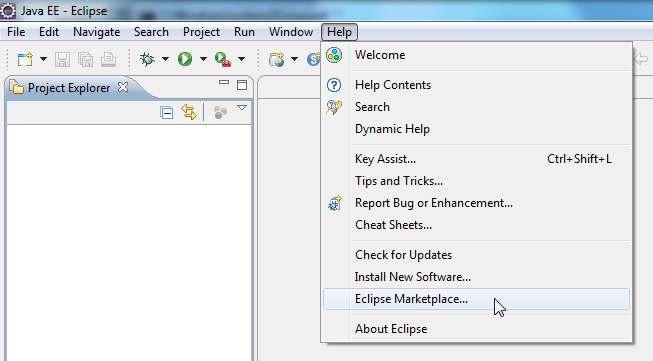
1) Open the Eclipse Marketplace through Help -Eclipse Marketplace.

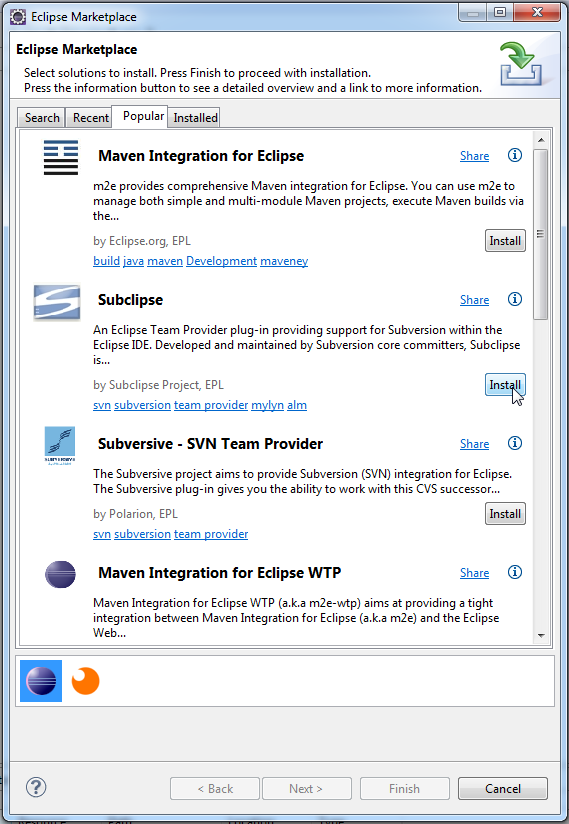
2) Search for Subclipse, and click Install.

3) Select all available Subclipse modules for installation, and accept the license agreement. Choose to restart Eclipse when prompted.

Connecting to Your Repository

With Subclipse installed we can now connect to an SVN repository, check out code, commit changes, and more of that good stuff. Subclipse provides several new views that will help us with these SVN tasks.

1) Go to Windows -> Views -> Other to open a list of all available views. …

Programming
24 April 2012 0 Comments

Parsing Proteins in the GenBank/GenPept Flat File Format with BioJava 1.8.1

This post describes parsing annotated protein sequences from the RefSeq database. I was unable to find any complete examples for parsing RefSeq protein sequences in .gpff.gz files with Java, so here is a quick and dirty one.

The Reference Sequence (RefSeq) collection aims to provide a comprehensive, integrated, non-redundant, well-annotated set of sequences, including genomic DNA, transcripts, and proteins. After downloading the latest release release from the FTP server, you end up with a lot of .gz files. An example of the filenames:

complete.1.1.genomic.fna.gz
complete.1.bna.gz
complete.1.genomic.gbff.gz
complete.10.bna.gz
complete.10.genomic.gbff.gz
complete.100.protein.gpff.gz

The README tells us that the filenames describe the type of information (genomic, protein, dna, rna). This information is split up in many (numbered) files. We are interested in protein information in the GenPept/GenBank Flat File format. Every file with protein information in this format has a name of the form complete.<number>.protein.gpff.gz.

Oh, and the regular expression for these filenames is:

^complete.[0-9]+.protein.gpff.gz$

Writing a parser…

Programming
18 April 2012 0 Comments

Fixing SAXParser Error “The system cannot find the file specified” for DTD files

When parsing an XML file with the SAXParser class, you may run into an error related to a .dtd file that cannot be found.

Example: We are parsing the file D:\homologene\build65\homologene.xml.

The first lines of the XML are:

<?xml version="1.0"?>
<!DOCTYPE HG-EntrySet PUBLIC "-//NCBI//HomoloGene/EN" "HomoloGene.dtd">
<HG-EntrySet>
  <HG-EntrySet_entries>
    <HG-Entry>
      <HG-Entry_hg-id>3</HG-Entry_hg-id>

We see a DOCTYPE declaration that points to a DTD file. DTD stands for Document Type Definition, and it is used to define the format of the XML file. The SAXParser will automatically look for this file in the same directory as the XML file.

When parsing we get the following error:

java.io.FileNotFoundException: D:\homologene\build65\HomoloGene.dtd (The system cannot find the file specified)
  at java.io.FileInputStream.open(Native Method)
  at java.io.FileInputStream.<init>(Unknown Source)
  at java.io.FileInputStream.<init>(Unknown Source)
  at sun.net.www.protocol.file.FileURLConnection.connect(Unknown Source)
  at sun.net.www.protocol.file.FileURLConnection.getInputStream(Unknown

Programming
10 April 2012 0 Comments

Converting a Project from Ant to Maven

Introduction

I recently wanted to convert a number of Java projects from the Ant build system to the Maven build system. Unless you are very familiar with Ant and Maven this is not a trivial task. On this page I describe how I approached the problem, and how I dealt with the inevitable bumps in the road.

Note that the project conversions in this document are pretty much one-on-one. If you have a larger Ant project, you should consider a more modular approach for the resulting Maven projects.

Be sure to keep the Ant documentation and Maven documentation handy!

Analysing the Ant Project

As an example Ant project we look at a loader for the UniProt protein database [license].

We analyze the first two levels of the directory structure with the tree -L 2 command:

~/ant_projects$ tree -L 2
.
├── uniprot-loader
│   ├── build.xml
│   ├── docs
│   ├── etc
│   ├── lib
│   ├── src
│   └── test
└── utils
    ├── bin
    ├── src
    └── xsd
 
10 directories, 1 file

We have two directories, and the project we are after is called uniprot-loader. In the /uniprot-loader directory we see the Ant configuration file…

Linux
10 April 2012 0 Comments

About .bashrc, .profile, .bash_profile and .bash_login

How it works

There are various files that may be executed by the Bash shell when it is started. Usually they follow this logic:

  • When bash is invoked as an interactive login shell:
    1. Bash first reads and executes commands from the file /etc/profile, if that file exists.
    2. After reading that file, it looks for ~/.bash_profile, ~/.bash_login, and ~/.profile, in that order, and reads and executes commands from the first one that exists and is readable. Usually there is a default ~/.profile file, and ~/.bash_profile and ~/.bash_login usually do not exist.
  • When bash is invoked as an interactive non-login shell:
    1. Bash reads and executes commands from /etc/bash.bashrc and ~/.bashrc, if these files exist.
    2. The standard ~/.profile sources (runs) ~/.bashrc if it exists.

A login shell means a session where you directly log into a system, e.g. setting up a remote SSH session or logging in through a non-graphical text terminal. A non-login shell is then the type of shells you open after logging in: typically in a graphical session when you open a new terminal window.

The bottom line is that you should put customisations that should always be executed in ~/.bashrc!
Example

Example: After installing…

Tags: ,
Networking
25 November 2011 0 Comments

Wireshark: 802.11 Frame Display Filters

Introduction

When using a wireless network card in monitor mode (using airmon-ng), Wireshark will not just pick up Ethernet-level frames, but also the raw wireless 802.11 frames. This data is very interesting, but the volumes can be large: wireless Access Points send out a lot of “beacon frames” that you might want to filter.

In this post we provide a list of the most useful Wireshark display filters for 802.11 frames. Use them in Wireshark in the filter field displayed below.

802.11 Frame Format

The generic 802.11 frame structure is displayed below. Most of the interesting values are in the Frame Control section, because this section determines the type of the frame.

Display Filters

wlan.fc.type == 0           Management frames
wlan.fc.type == 1           Control frames
wlan.fc.type == 2           Data frames
wlan.fc.type_subtype == 0   Association request
wlan.fc.type_subtype == 1   Association response
wlan.fc.type_subtype == 2   Reassociation request
wlan.fc.type_subtype == 3   Reassociation response
wlan.fc.type_subtype == 4   Probe request
wlan.fc.type_subtype == 5   Probe response
wlan.fc.type_subtype == 8   Beacon
 
wlan.addr = 12:34:56:AB:CD:EF  Select frames where any of